


STARTING THE GENERATOR
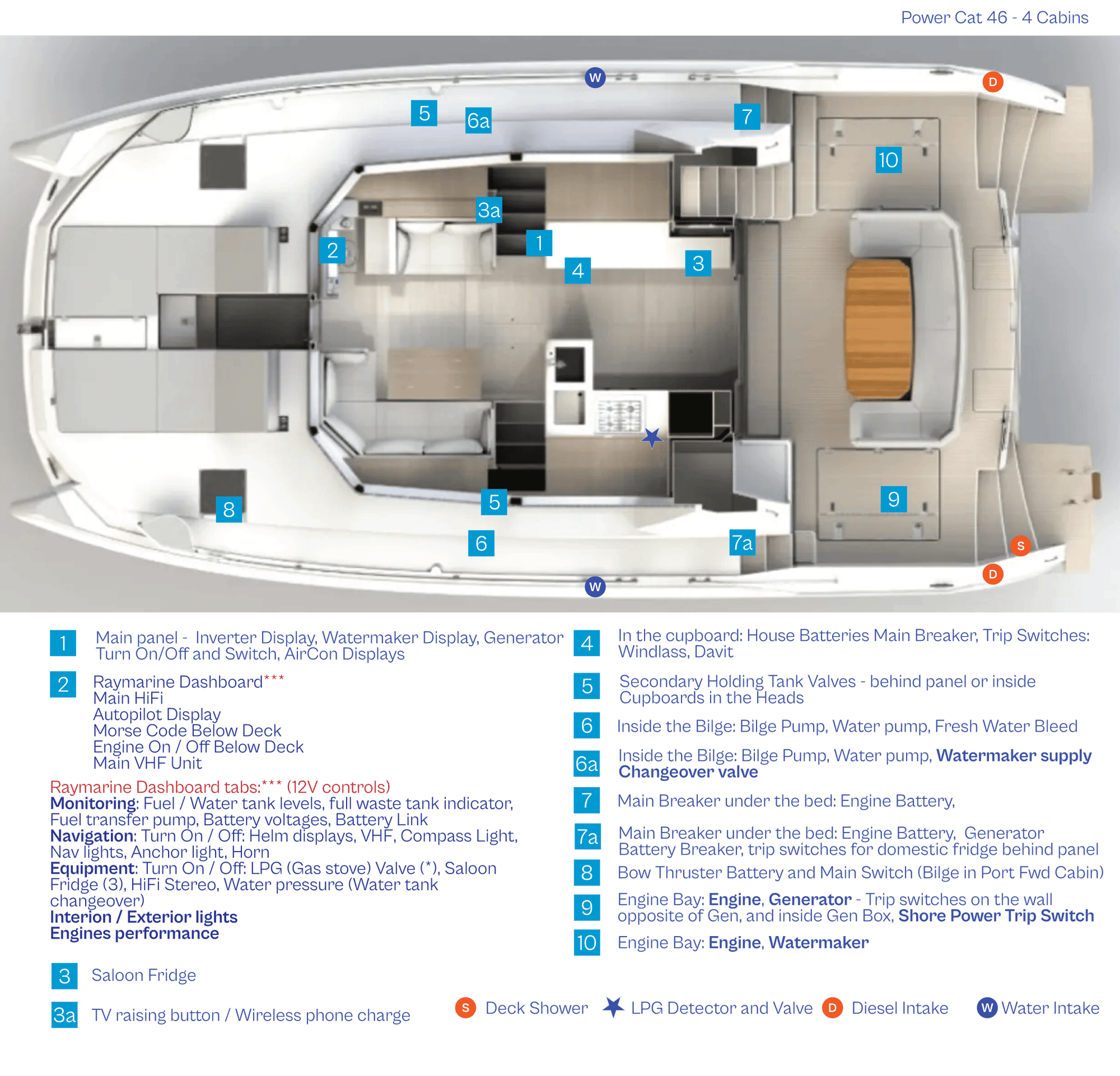
- Make sure all your breakers are OFF (1)
- Turn OFF the breaker for Shore 1 and Shore 2
- Move the plastic safety so you can access the Generator and Transfer switches
- On the generator panel, press down the GLOW switch for 10 seconds (2)
- Simultaneously, push UP the starter switch and hold until the generator is on
- Keep holding your GLOW switch for a couple of seconds after the generator has started
- Turn ON the breaker for Generator and Transfer (3)
- Slowly turn on the breakers on the 110V panel one at a time with a couple of seconds between each
NEVER RUN THE GENERATOR WHILE UNDER WAY!
GENERATOR TRIP SWITCHES AND INTAKE FILTER
If you have overloaded your generator, it will trip out. You can find the trip switches marked as number 9 on the layout picture.
And sometimes if some seaweed is in the intake filter, it will cause the generator to overheat and stop working.
WHAT TO DO IF YOU ARE NOT GETTING ELECTRICITY FROM THE GENERATOR
-
Turn off all switches on main panel
-
Turn off generator
-
Go to trip switch for your generator marked on the layout picture and check all switches are in ON position
-
Go to trip switch ON the generator - all switches need to be in ON position, and the red button needs to be easily pressed
-
If the generator doesn't turn ON or stay ON - call us.
MY WATER INDICATION IS SHOWING RED AND I HAVE NO WATER?
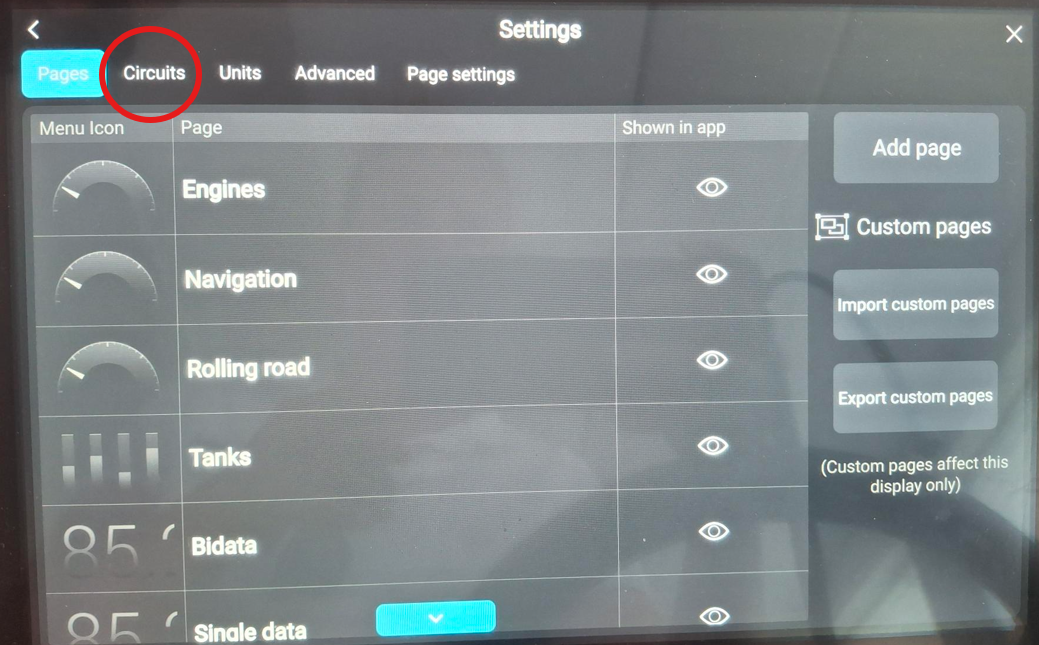
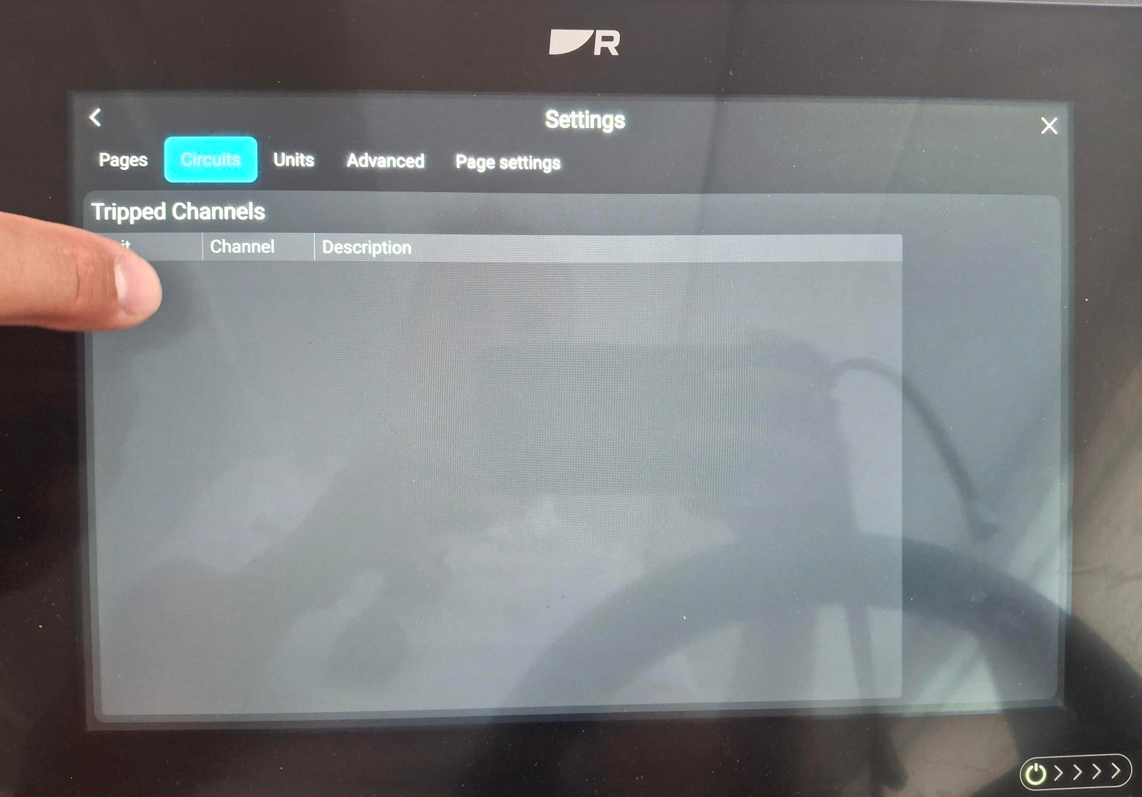
Sometimes the circuits need to be reset for a certain part of this boat, as it has a lot of electrical controls. Most common circuit to trip is the water pump. In case you have no water coming out of taps, and there is red light on the water pump on your main dashboard (no. 2 on layout picture) and follow procedure (in pictures below):
-
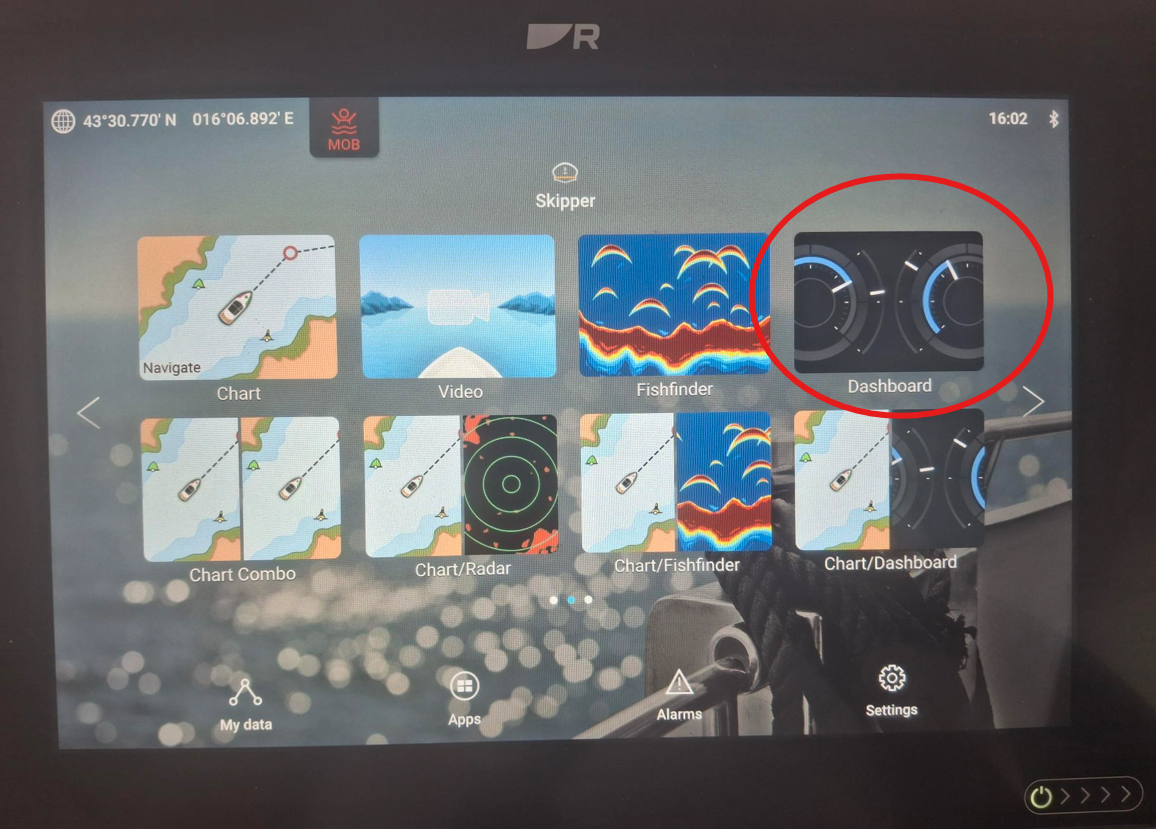
Press the dashboard from your home screen (may say yacht sanse instead)
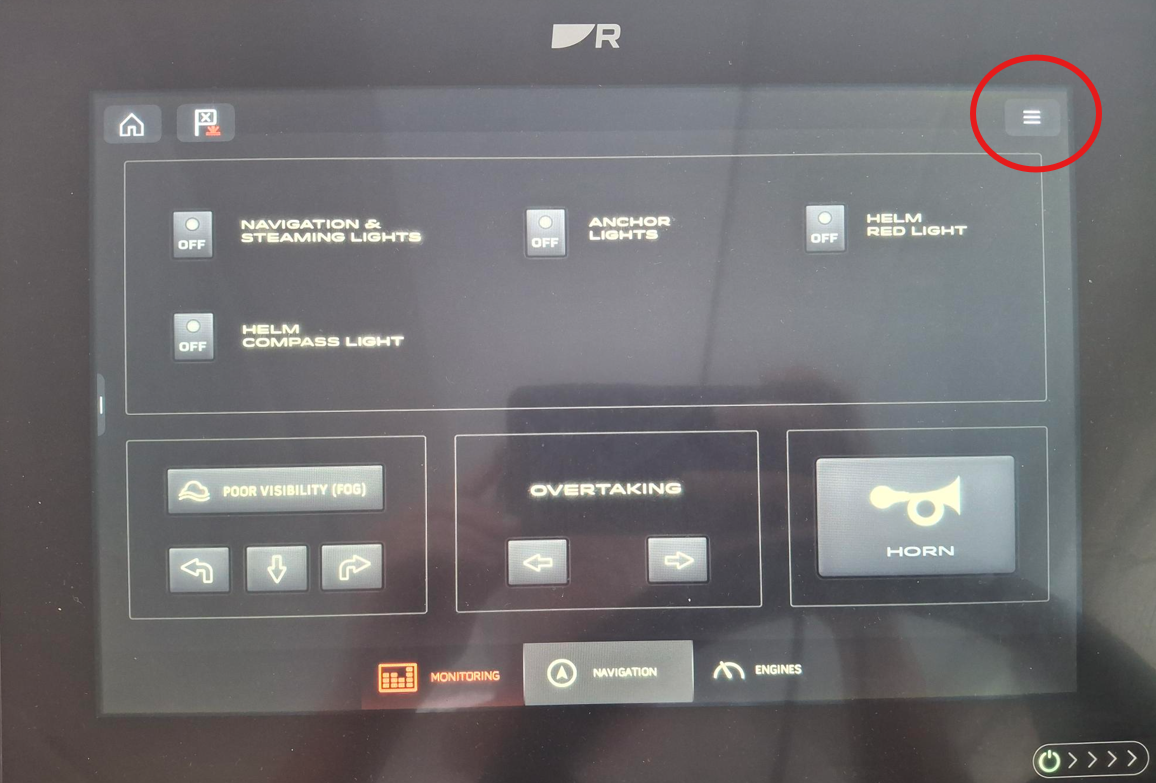
- select the three dashes in upper right corner
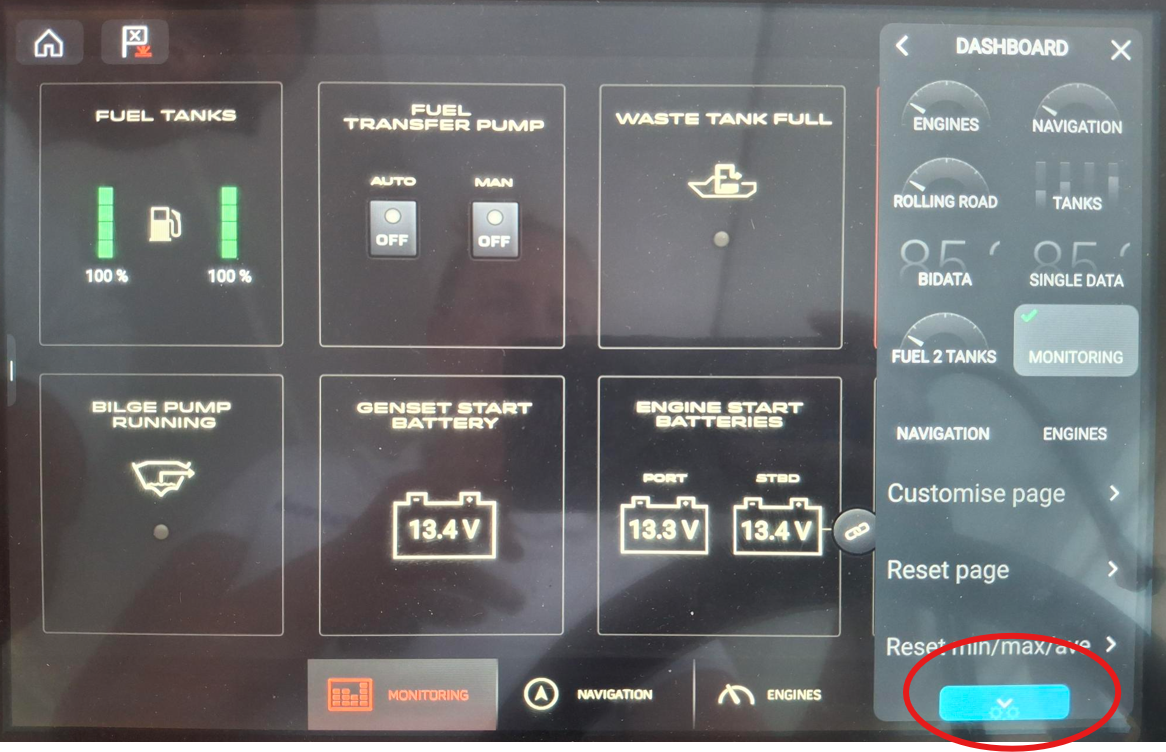
- scroll down more to find more settings (icon is three cogs)
- select the Circuits tab
- click the tripped channel and choose RESET
All should be good to use
HOW DO I KNOW IF MY WATERMAKER IS ON 12V OR NEEDS THE GENERATOR?
AQUA BASE, BLUE WATER OR PARKER?
USING THE PARKER WATER MAKER
- Make sure you are not under way and not in less than 4ft of water
- Turn ON your generator (1) - skip if WM is connected to 12V
- Turn ON your water maker breaker (2)- skip if WM is connected to 12V
- Wait 10 minutes for the flushing to be done - your water pump will be turning itself on periodically- skip if WM is connected to 12V
- Push START on the watermaker panel. (3) The "system on" light will come on. In a couple of minutes, the "potable water" light will come on, meaning water is being produced.
- About 3 hours are needed to fill up average water tanks with water. Track your water levels on your dashboard or on your fresh water tanks. Some boats have the overflow to your bilges, making your bilge pumps active, so turn off the water maker when there is enough water in your water tanks. Overfilling your water tanks can also cause breakages of the tanks themselves.
- Push STOP on the watermaker panel (3)
- Wait 10 for the flushing to be done, then turn the water maker breaker OFF (2) - skip if WM is connected to 12V
WHAT IF "NEEDS SERVICE" LIGHT IS ON?
MY DISPLAY ISN'T WORKING?
WHAT IF ONLY 1 TANK IS FILLING UP?
Different types of boat have different water maker locations, and different settings for the valves and overflow. For the 46 PC, water tanks are in each hull inside the boat in the bilges. Overflowing them will trigger your bilge pump to work. Fresh water change-over valve is built into the dashboard, visible under "equipment". Filling up both your water tanks simultaneously with the water maker isn't possible - after filling up one tank with watermaker-produced water, you need to go into the starboard bilge and close a valve, which will enable the port side to fill up.
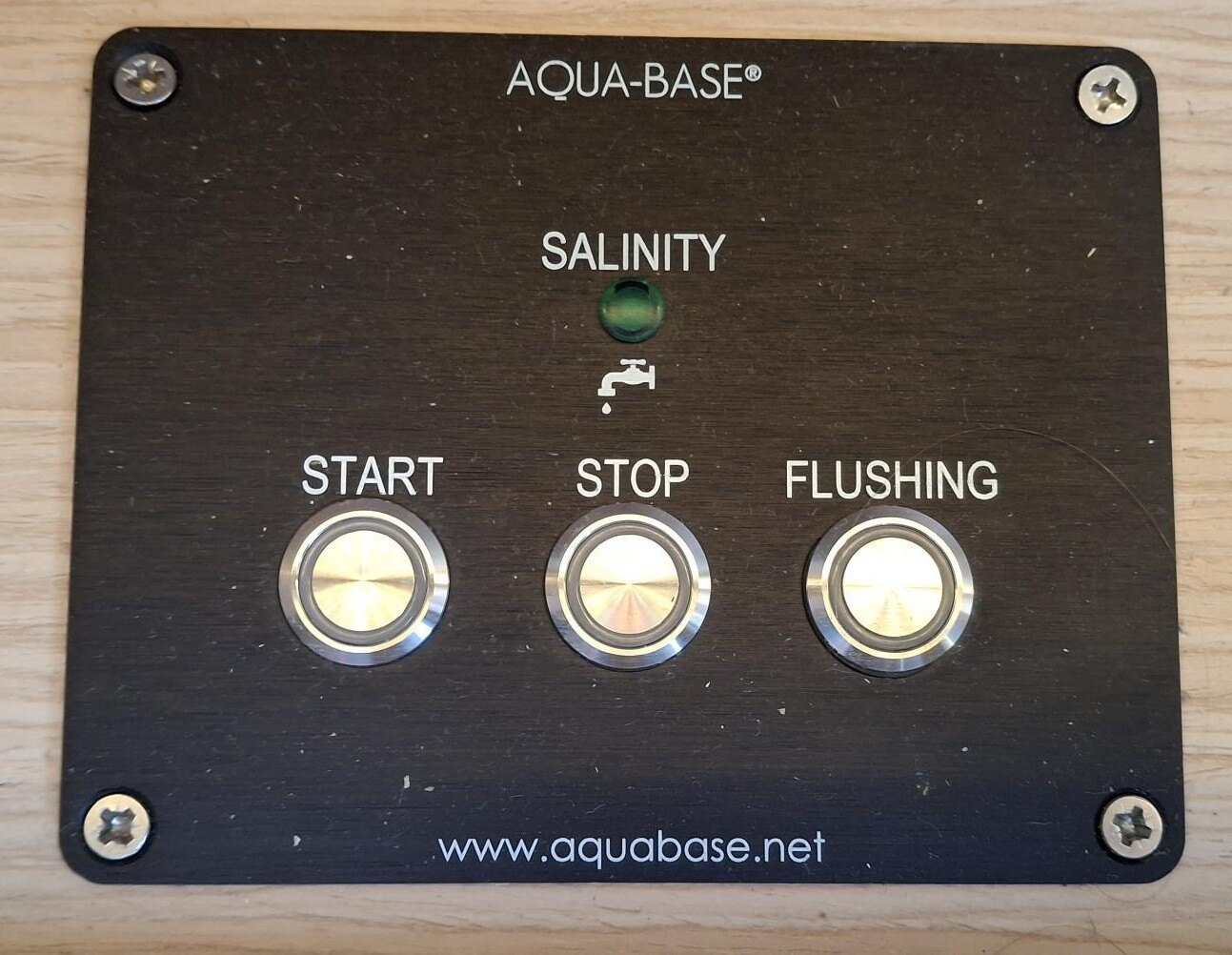
USING THE AQUA BASE WATER MAKER
- Make sure you are not underway and not in less than 2 m of water
- Check that your water pump is ON on the main panel.
- Turn ON your generator if you need.
- Push the START button on the panel. The green light will start indicating the water production.
- Normal production of the water is between 40 and 60 litres per hour. Track your water levels on your main panel, and turn off the water maker when there is enough water in your water tank. Overfilling your water tanks can also cause breakages of the tanks themselves.
- Press STOP to stop producing water.
- Wait a couple of minutes.
- Press FLUSHING button to flush the system. This will be a 3-minute process. After that, the system is in standby mode.
- Turn OFF your generator if you were using it.
USING THE AQUA BASE WATER MAKER
- Make sure you are not underway and not in less than 2 m of water
- Check that your water pump is ON on the main panel.
- Turn ON your generator if you need.
- Push the START button on the panel. The green light will start indicating the water production.
- Normal production of the water is between 40 and 60 litres per hour. Track your water levels on your main panel, and turn off the water maker when there is enough water in your water tank. Overfilling your water tanks can also cause breakages of the tanks themselves.
- Press STOP to stop producing water.
- Wait a couple of minutes.
- Press FLUSHING button to flush the system. This will be a 3-minute process. After that, the system is in standby mode.
- Turn OFF your generator if you were using it.
.jpg?width=2000&height=1500&name=shared%20image%20(34).jpg "shared image (34)")
STILL NOT WORKING? CALL US ON OUR TECHNICAL SUPPORT NUMBER FROM YOUR BOAT PAPERS!
WE ALSO USE WHATSAPP!!
If we do not pick up immediately, please send us a WhatsApp with the name of your boat and problem description, and we will call you as soon as possible. Also kindly note that calls between 22.00 and 07.00 are considered emergency situations. Details about Sunsail and The Moorings 4-hour commintment can be found below:


- Sail with Sunsail
- Traveling
- About
- Legal
- Keep in touch
- Social
Sunsail Limited – 93 North Park Place Blvd, Clearwater, Florida 33759